A friend of mine spent four months applying to jobs last year. Marketing roles, mostly. She had five years of solid experience, two industry certifications, and what I thought was a genuinely decent CV. Forty-seven applications. Three auto-rejection emails. Forty-four complete silence.
She thought she was not good enough. She started questioning her whole career. Maybe she needed to go back to school. Maybe the industry had moved on without her.
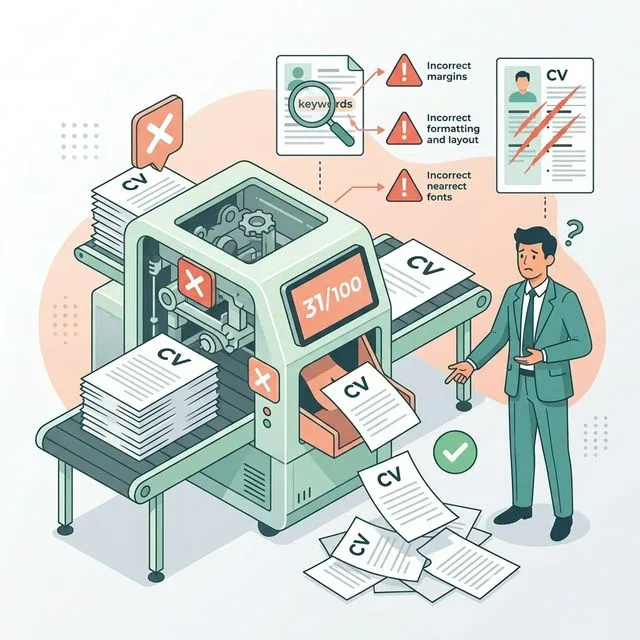
Then she ran her CV through an ATS checker. The score came back at 31 out of 100. Not because she was unqualified. Because her CV was formatted in two columns, her section headers were slightly non-standard, and the job-specific keywords were buried in places the software could not find them.
Forty-seven applications. Zero callbacks. And a human recruiter probably never read a single one.
What Is ATS and Why Should You Care
ATS stands for Applicant Tracking System. Think of it as a very literal-minded robot that sits between you and every recruiter at a company. When you hit submit on an application, your CV does not land in a person's inbox. It lands in this system first.
The software reads your CV, pulls out information like your name, job titles, skills, and education, then scores you against whatever criteria the recruiter set up for that specific role. If you score above the threshold, your CV gets passed to a human. Below it, you get the automated rejection email. Or worse, nothing at all.
Here is the part that gets people: 98% of Fortune 500 companies use ATS. And it is not just the big ones anymore. Plenty of medium-sized companies use it too because nobody has time to read three hundred CVs for one open position. The software does the first cut.
The number you need to know: Studies put ATS pre-filtering at roughly 75% of all applicants. Three out of four CVs never reach a human. If you have been applying to jobs and hearing nothing, there is a real chance the problem has nothing to do with your qualifications.
The Stuff That Gets You Filtered Out Immediately
Most of these will surprise you because they have nothing to do with whether you are actually good at your job.
Two-Column Layouts
This one kills more CVs than anything else. Visually, a two-column CV looks sharp. Clean. Professional, even. But ATS software reads left to right, top to bottom, in one pass. When it hits two columns, it often reads across both columns on the same line, mixing content from completely different sections. Your job title ends up mashed together with a skill from the sidebar. The software cannot make sense of it and either misfiles the information or drops it entirely.
The CV template that won you compliments from friends might be the exact thing that has been quietly getting you rejected for months.
Text Inside Boxes, Headers, and Footers
Some CV builders love putting your contact details in a fancy designed header box at the top of the page. Looks great. But a lot of ATS systems completely skip headers and footers when parsing. So your name, email, and phone number simply do not exist as far as the software is concerned.
Similarly, text boxes anywhere in the document are often ignored entirely. If you listed your key skills or your LinkedIn URL inside a text box, there is a good chance the ATS never saw any of it.
Creative Section Names
If your CV says "Where I Have Made My Mark" instead of "Work Experience," the ATS might not recognize it as a work history section at all. These systems are pattern matchers. They look for specific words they know how to categorize. "Career Journey," "My Story," "Professional Chapter" , all of these sound interesting to a human and mean nothing to software.
Stick with: Work Experience, Education, Skills, Certifications. Boring is fine. Boring gets through.
Missing Keywords From the Job Description
This is the big one people miss. ATS systems score your CV partly by matching keywords from your document against keywords in the job posting. If the job description says "Google Analytics" and your CV says "web analytics tools," the software might give you zero points for that skill even though you clearly know what Google Analytics is.
You have to use their exact language. Not synonyms. Not paraphrases. The actual words from the job posting.
Quick test: Copy the job description into a word frequency tool. Find the nouns and skills that appear most often. Now check if those exact words appear in your CV. If they do not, the ATS is probably scoring you lower than candidates who used the same phrasing even if those candidates are less qualified than you.
Images, Graphics, and Icons
Some CVs use little icons next to contact details, graphical skill bars showing proficiency levels, or small profile photos. All of it is invisible to ATS. The software cannot read images. It skips them. So those five skill bars showing your level of proficiency in various programs? From the ATS perspective, that section does not exist.
Unusual File Formats
PDF is generally safe but not universally so. Some older ATS systems parse Word documents better than PDFs. A few cannot handle PDFs at all. If the job application does not specify a format, PDF is usually the right call. But if it says Word document, send a Word document. Do not be clever about it.
What ATS Actually Wants to See
Here is the good news. ATS-friendly CVs are not harder to write. They are just different from what a lot of CV templates produce.
Single Column, Standard Layout
One column. Your name and contact details at the top in the main body of the document (not in a header/footer). Then your sections flowing down the page in order. That is it. Clean and readable for both software and humans.
Standard Section Headers
- Work Experience (or Professional Experience)
- Education
- Skills
- Certifications
- Summary or Professional Summary
These are the words the software knows. Use them.
Keywords Pulled Directly From the Job Posting
Read the job description carefully. Underline every skill, tool, qualification, and phrase that describes what they want. Now check your CV and make sure those exact terms appear in your document. Not all of them , do not stuff your CV with keywords that have no basis in your actual experience. But the ones that genuinely apply to you should appear in your CV using their exact wording.
Dates in a Consistent Format
Month Year to Month Year. Pick a format and stick to it throughout. "January 2022 to March 2024" and "Jan 2022 - Mar 2024" and "01/2022 - 03/2024" are all fine individually. Mixing them in the same document confuses parsers.
Simple Fonts, No Fancy Formatting
Arial, Calibri, Times New Roman, Helvetica. These are safe. Anything decorative or unusual risks characters being misread or skipped. And please, no colored text sections, no gradient backgrounds, no watermarks. All of it creates noise that the software does not know what to do with.
The 10-Minute ATS Fix You Can Do Right Now
Copy your entire CV and paste it into a plain text editor like Notepad. Remove all formatting. What you see is roughly what an ATS sees.
Does it still make sense? Is the information in a logical order? Are your job titles clearly connected to company names and dates? Can you tell which section is which?
If the plain text version looks like a scrambled mess, that is what the ATS is working with. That is the version that is getting scored.
Fix the formatting issues first. Then go through the job description for the role you want and make sure the key terms actually appear in your document.
Want a faster answer? Run your CV through FreeCV's free ATS checker. Paste your CV text, get a compatibility score, and see exactly what the system is struggling to read. It takes about two minutes and you will know immediately what needs fixing.
But Will ATS-Friendly Mean Boring to Humans?
This is the worry, and it is a fair one. Nobody wants to hand over a CV that looks like a tax form.
Here is the thing though. An ATS-friendly CV does not have to be ugly. Clean design with a single column, good use of white space, a clear hierarchy of information, and consistent formatting can look genuinely professional. It is only the gimmicks that need to go: the columns, the boxes, the graphics, the non-standard fonts.
The content is still yours. The achievements are still yours. The personality comes through in what you write, not in how many columns you used.
And honestly? Most senior recruiters prefer a clean, easy-to-scan CV over something that looks like a brochure. The human reading it after the ATS passes it through is also going to be on their fifth CV of the morning. They appreciate easy.
A Few Things Worth Knowing
Not every company uses ATS. Small businesses, startups, and some creative agencies still read CVs the old-fashioned way, meaning a human opens every application. If you are applying to a ten-person company, ATS optimization matters less. If you are applying to any company large enough to have an HR department, assume the system exists.
Also, some ATS platforms are better than others. Greenhouse, Lever, and Workday are fairly sophisticated and handle PDFs reasonably well. Older systems built on legacy software can be much more brittle. Since you usually cannot know which system a company uses, it is safer to format for the worst-case scenario.
And one more thing. Keyword matching is only part of the score. Some systems also look at how recently your experience is, whether your job titles match the seniority level they are hiring for, and whether you have the specific qualifications listed as requirements. So if a role says "degree required" and your education section is buried or missing, that might knock you out regardless of how clean your formatting is.
The Short Version
- 75% of CVs are filtered out by ATS before a recruiter sees them
- Two-column layouts, text boxes, and graphic elements often break ATS parsing
- Use standard section names like Work Experience and Education
- Mirror the exact keywords from the job description in your CV
- The plain text test tells you what an ATS actually sees when it reads your document
- ATS-friendly does not mean ugly. Clean and simple is better for everyone
- Test your CV before sending it. It takes two minutes and saves weeks of silence
Frequently Asked Questions
What percentage of CVs are rejected by ATS before a human sees them?
Around 75%. Three out of every four CVs submitted to companies using ATS software never reach a human recruiter. The software filters them automatically based on formatting, keywords, and file structure before any person gets involved.
Does ATS rejection mean I am not qualified for the job?
Almost never. ATS rejection is nearly always a formatting or keyword issue, not a judgement on your actual abilities. Plenty of highly qualified candidates get filtered out because their CV used a two-column layout or did not include the exact phrasing from the job posting. The software matches patterns. It does not assess capability.
How do I know if my CV will pass ATS screening?
The fastest way is to use a free ATS checker. FreeCV has one where you paste your CV text and get an instant score with specific feedback. You can also do a quick manual check by pasting your CV into a plain text editor and seeing if the content still makes logical sense without any formatting.
What CV formats does ATS struggle with most?
Two-column layouts, tables, text boxes, headers and footers, images and graphics, and design-heavy templates. The safest format is a single-column document with standard section names, no graphics, and clean simple fonts throughout.
Do small companies use ATS?
Some do, some do not. Very small businesses and startups often do not use ATS at all. The larger and more established the company, the more likely they have some form of applicant tracking in place. If you are applying to a company with a proper HR department, it is safer to assume ATS is part of the process.
Find Out If Your CV Is ATS-Ready
Paste your CV into our free ATS checker and get an instant score with specific fixes. Takes two minutes.
Check My CV Free →Start With an ATS-Optimized Template
Every FreeCV template is built to pass ATS screening from the start. No columns, no text boxes, no hidden traps.
Build My CV Free →