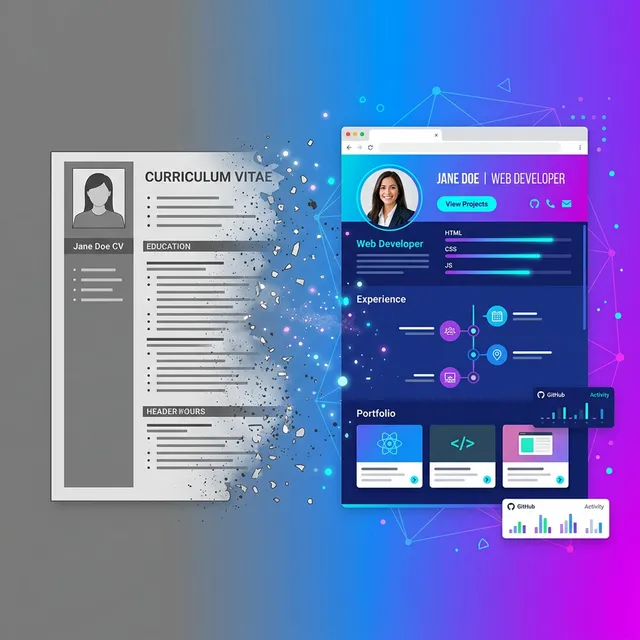
Let me paint you a picture. It's 2026. You can order groceries with your voice, your fridge knows when you're out of milk, and your watch tracks your sleep cycles down to the minute. But when it comes to applying for jobs? We're still emailing file attachments like it's 2005.
Think about that for a second.
The PDF CV had a good run. It really did. But here's the problem: the world moved on, and the PDF didn't. It's a frozen snapshot of who you were the day you exported it. Three weeks later you finished that certification? Too bad, the PDF doesn't know. Got promoted? The version sitting in that recruiter's downloads folder still says your old title.
The Attachment Problem Nobody Talks About
Here's something most job seekers don't realize. When you email a PDF CV, you're basically hoping for a chain of small miracles to happen:
- The recruiter actually opens your email (not guaranteed, they get hundreds a day)
- They download the attachment (some companies block attachments entirely)
- They remember which file is yours among the 47 other "John_CV_Final_v3.pdf" files in their downloads
- They can actually read it on their phone (spoiler: most PDFs look terrible on mobile)
- They share it with the hiring manager without it getting lost in a forwarding chain
That's five things that need to go right. Five. And if any single one fails, your carefully crafted CV might as well not exist.
I don't know about you, but those aren't odds I love.
What If Your CV Was Just... a Link?
Okay, stay with me here. What if instead of attaching a file, you just dropped a link? Like, one single URL that anyone could click and instantly see your entire professional story. On any device. Always up to date. Looking sharp every single time.
That's not some future concept. People are already doing this. And recruiters? They actually prefer it.
Anecdotally, every recruiter I've talked to in the last year says the same thing: links get clicked, attachments get skipped. Clicking a link takes one second. Downloading and opening a PDF takes... well, more than one second. And in recruiting, every extra step is a step where someone gives up. There isn't a single neat headline statistic I can point to here (the "2.7x more clicks" number that gets thrown around in other articles doesn't trace back to a verifiable LinkedIn report when you actually look for it), but the directional truth is something every hiring manager will tell you out loud.
ًں’، Think about it this way: When someone links you a YouTube video versus sending you an .mp4 file, which one are you more likely to watch? Exactly. Same energy.
The Rise of the Portfolio CV
So what does a "link CV" actually look like? It's not just your PDF hosted online. That would be boring and kind of pointless.
A proper portfolio CV is a living, breathing web page. It's got your name up top, maybe an animated header section that doesn't look like a Word document from 2012. Your job history is laid out clean, with real spacing and proper typography. Your skills are visually organized. Your projects have links people can actually click.
And here's the kicker: you edit it once, and every single person who has your link sees the updated version. No resending. No "oh wait, don't look at that version, here's the new one." It just updates. Like every other thing on the internet.
Wild concept, right? A CV that works like a normal website in 2026? Groundbreaking.
But Wait, Can't I Just Use LinkedIn?
I hear this one a lot. And look, LinkedIn is fine. It does what it does. But there are some pretty obvious problems with relying on it as your CV:
- You don't own it. LinkedIn can change their layout, algorithms, or your page visibility whenever they want. You have zero control.
- It looks like everyone else's. Every LinkedIn profile has the exact same template. There's no way to stand out visually.
- The URL is ugly. Nobody remembers linkedin.com/in/john-smith-847291b3. Nobody.
- Ads everywhere. Your professional profile sits next to job ads, promoted posts, and "John is celebrating 7 years at..." notifications.
- No analytics. You don't know who viewed your profile, how long they stayed, or what they clicked. (The premium version barely helps.)
Compare that to having your own page at something like livelink.cv/yourname. Clean URL. No ads. Your branding. Your layout. You know who's looking.
There's no competition, honestly.
The .cv Domain: Your Name on the Internet's Front Door
Alright, this part is genuinely cool and most people still haven't heard about it.
There's a domain extension called .cv. As in, curriculum vitae. So you can literally own yourname.cv as your personal professional URL. Ahmed.cv. Sarah.cv. Whatever your name is followed by .cv.
Now imagine putting that on your email signature. Or your business card. Or just casually dropping it in a conversation: "Yeah, my portfolio's at ahmed.cv." That hits different than saying "let me email you my CV later."
It's memorable. It tells people exactly what they'll find. And it makes you look like someone who has their stuff together. Because let's be honest, in a stack of a hundred applications, the person with their own .cv domain is going to stick in a recruiter's brain.
ًں’، Fun fact: .cv is the country code for Cape Verde (Cabo Verde), but it's open for anyone to register. Just like .io became the go-to for tech companies, .cv is becoming the go-to for professionals. And most names are still available because most people haven't caught on yet.
What Recruiters Actually See (Behind the Scenes)
I talked to a few recruiters about this whole PDF versus link thing, and their responses were... not surprising but still worth sharing.
One recruiter at a mid-size tech company told me she opens maybe 60% of PDF attachments. The rest get skipped based on the email subject line alone. But links? She clicks almost every single one. "It's just easier," she said. "I can skim it in two seconds without downloading anything."
Another recruiter mentioned something interesting about sharing. When she finds a good candidate, she needs to forward the CV to the hiring manager. With a PDF, that's another email with another attachment. With a link, she just pastes the URL in Slack. Done. Takes three seconds.
And here's one that surprised me. Several recruiters said they actually judge candidates who send portfolio links more favorably. Not because the content is necessarily better, but because it shows the person is tech-savvy and cares about presentation. "It's a signal," one of them said. "If someone took the time to build a proper online presence, they probably take their actual work seriously too."
The Mobile Problem Your PDF Can't Solve
Here's something that should change how you think about CV format: a clear majority of business emails get their first open on a phone. Litmus and Mailchimp benchmarks have consistently shown mobile-first open rates above 50% for years now, and that share hasn't gone backwards in 2026.
Now, have you ever tried reading a PDF CV on your phone? It's awful. You're pinching and zooming, scrolling sideways, trying to read 10-point font on a 6-inch screen. Half the formatting breaks. Tables overlap. Your carefully aligned columns turn into a jumbled mess.
A portfolio page, on the other hand, is built to be responsive. It looks good on a laptop, a tablet, and a phone. The text reflows. The layout adapts. Everything is readable without squinting. Because that's how websites work in 2026. PDFs still don't know what a screen size is.
Always Updated. Never Stale.
This might be the single biggest advantage and it's so obvious that I'm surprised more people don't bring it up.
When you update your portfolio, every link to it immediately shows the new version. Every. Single. One. The link your cousin shared six months ago? Updated. The one in your email signature? Updated. The one the recruiter bookmarked three weeks ago? You guessed it.
With a PDF, you'd have to re-export, rename the file, re-upload, re-send it to everyone who has the old version... and let's be real, you're not going to do that. Nobody does that.
So what happens is you end up with fifteen different versions floating around: some with your old job, some with typos you fixed, some with a weird formatting glitch you didn't notice until after you sent it. It's a mess.
One link. Always current. Problem solved.
Analytics: Know Who's Actually Looking
This one is huge and it's something PDFs literally cannot do.
When you send a PDF, it vanishes into the void. You have no idea if anyone opened it. Did the recruiter spend 30 seconds on it or 5 minutes? Did they look at your projects section? Did they download it and share it with their team? You'll never know.
With a portfolio link, you can see exactly how many people visited your page. You can see when they visited. How long they stayed. Which sections they looked at. Whether they clicked through to your project links or GitHub.
That's not creepy, by the way. That's just... how websites work. Every business on the planet tracks who visits their site. But somehow job seekers are still flying completely blind with their 200KB PDF attachment. Make it make sense.
"But I Still Need a PDF for Some Applications"
Fair point. Some job applications specifically ask for a PDF upload. ATS systems need file uploads. That's reality. And you should absolutely have a PDF version ready for those situations.
But here's the thing: the two aren't mutually exclusive. You keep your portfolio page as your main, always-updated professional presence. And when some online form demands a PDF upload, you export one. Best of both worlds.
Actually, most good portfolio builders (including FreeCV, not to toot our own horn) let you download a PDF version of your portfolio with one click. So your portfolio IS your CV. It just also happens to live on the internet where people can actually find it.
âڑ ï¸ڈ Quick heads up: If you're uploading to an ATS, make sure your PDF is text-based, not a screenshotted image of your portfolio. ATS systems can't read images. Export a clean, simple PDF for those uploads.
How to Actually Set This Up (It Takes Like 5 Minutes)
Alright, practical stuff. If you're sold on the idea, getting started is ridiculously easy:
- Build your CV online. Use a tool like FreeCV's AI builder. Chat with the AI, tell it about your experience, and it puts your CV together for you. Takes maybe 10 minutes if you're thorough.
- Pick a portfolio template. There are a bunch of designs to choose from. Some are modern and minimal, others are bold and colorful. Pick what matches your vibe.
- Claim your URL. You can grab something like livelink.cv/yourname for free. Or if you want to go all in, snag yourname.cv for a proper custom domain.
- Share your link everywhere. Email signature. LinkedIn bio. Twitter. Instagram bio. Business cards. Everywhere someone might want to learn about you professionally.
That's it. No hosting to worry about. No code to write. No domains to configure (unless you want the .cv, which we handle for you anyway). Your portfolio is live, it looks great on every device, and it updates automatically whenever you make changes.
The Bottom Line
Look, I'm not saying PDFs are completely useless. They still have their place for specific upload requirements. But as your primary way of presenting yourself to the professional world?
They're done. They've been done for a while.
The people getting ahead right now are the ones who figured this out early. They have a clean link they drop everywhere. They know who's viewing their page. Their CV is never outdated. They look professional without even trying.
And the best part? Setting this up costs nothing. Literally zero dollars for a portfolio page that looks like a million bucks. The .cv domain is an extra flex if you want it, but it's not required.
Your move.
Quick Recap
- PDF CVs get lost, go stale, and look terrible on mobile
- A portfolio link is always current, always accessible, always professional
- Recruiters consistently report clicking links far more often than opening attachments
- Portfolio pages give you analytics: who visited, when, how long
- The .cv domain extension is criminally underused and most names are still open
- You can still export a PDF when applications require one
- Setting this up takes five minutes and costs nothing
Ready to Ditch the PDF?
Build your free portfolio in minutes. AI does the heavy lifting. Pick a template, claim your link, and stop emailing attachments.
Build My Portfolio Free →